Hello All,
The July 2017 patch-set for EPBCS/PBCS includes new options to execute Clear Cube definitions/jobs. Oracle has been slow to get the new features out. The delay was driven by the need to add options to address the relational data as well as the Essbase data.
Now that the functionality has been updated/enabled what can we do?
We can use the REST APIs and EPMAutomate to call the Clear Cube job(s) externally…FINALLY!!!!
1st – The new look for the Clear Cube definition inside the Simplified Interface:
BEFORE:

AFTER:
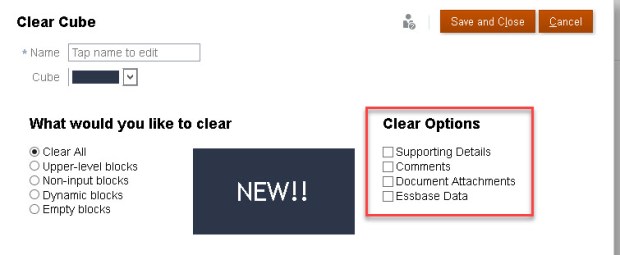
2nd – An observation:
Sometimes all the Clear Options are available and sometimes they’re not. (Basic or Advanced)


3rd – Using EPMAutomate to run the Clear Cube Job
Install the EPMAutomate version 17.07.74 (or greater, depending on when you read this).
Per Oracle’s updated documentation:
clearcube
Deletes specific data from input and reporting cubes using the settings specified in a job of type clear cube. This command does not delete the application definition in the application’s relational tables. See Clearing Cubes in Administering Planning for Oracle Planning and Budgeting Cloud.
Usage: epmautomate clearcube JOB_NAME, where: JOB_NAME is the name of a job defined in the application.
Example: epmautomate clearcube ClearPlan1
The command is straight forward and works!!!

I hope this brief update was helpful.
RELEASE DATES:
- Application to Test environments – July 07,2017
- Application to Prod environments – July 21, 2017
/*****BTW if you are testing the patch updates and find an issue; be sure to include the word “Regression” in you SR. This will help route your ticket to Oracle Product Development.*****/
Thanks for reading.
Scott Williams
 EPM4ALL
Thanks for sharing!