Hello and welcome to this post.
Recently I was working with a client who wanted to pull EBS data as well as data from other sources into HFM conversion and consolidation. Ok, so the data load is standard process work for FDMEE, and the rest is standard HFM functionality; so its all good.
After the period is closed in HFM the data needs loaded to PBCS, simply and seamlessly by a user….OK the last part took some thought.
Thought process:
- The data flow was/is straight forward.
- I knew I was restricted to flat files for moving data into this instance of PBCS.
- How could I get this all linked together and keep it simple enough for a user to execute?
- I had an on-premise version of FDMEE to work with, which gave me that added flexibilty of scripting.
- Version is 11.1.2.4, so the functionality to extract the data from HFM using FDMEE was in play.
With the goal of keeping the user process simple and seamless I came up with the process below.
The End User Process:
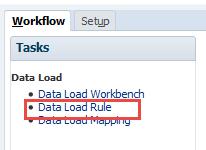
Executes the Data Load Rule after the period/month has been closed.
FDMEE on-premise
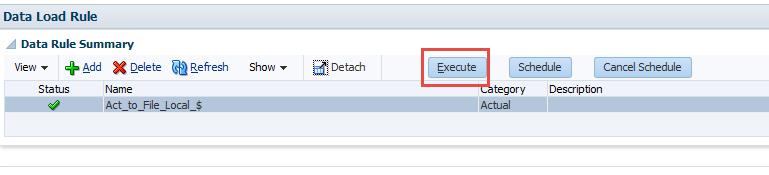
Run the Data Load Rule:

Select the Location:

Execute

Select parameters and run it.
Start and End Period must be the same.

Seems straightforward for a non-technical user.
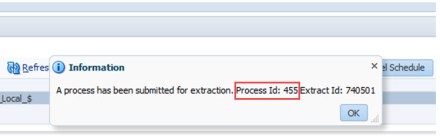
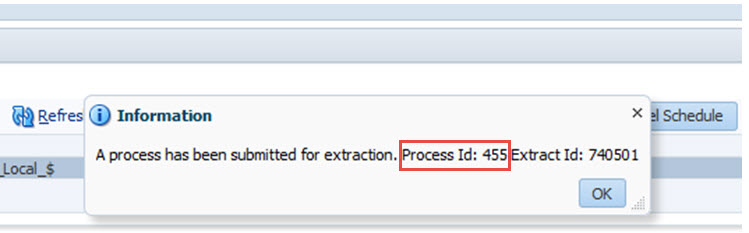
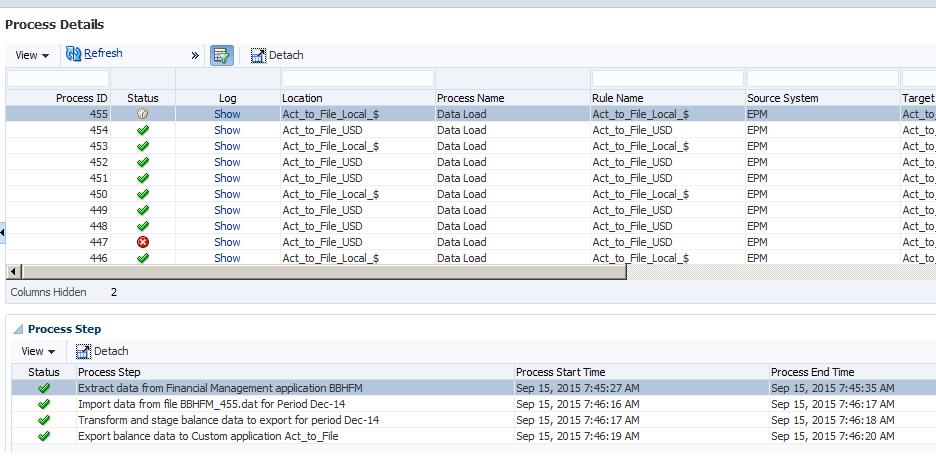
If inclined the user can review the process details.
Process Details:
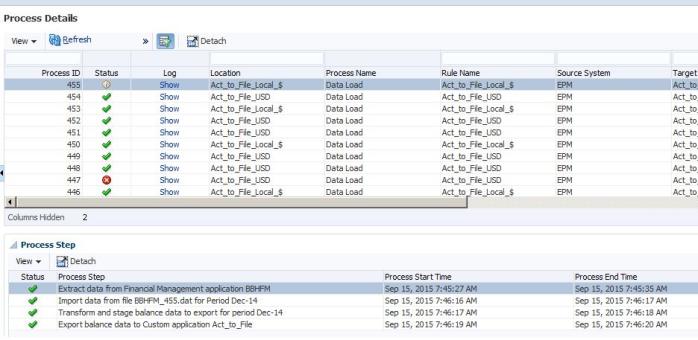
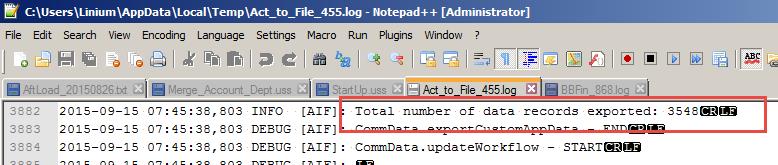
On-premise output:
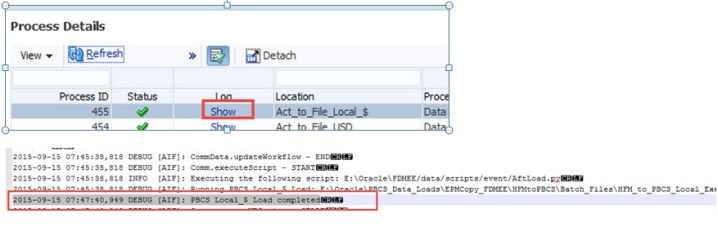
Extracted record count for rows of data = 3548

Now jump to PBCS.
Imported record count = 3548

The data was loaded to Planning.
Users validated the data.
Seems we are good.
All done from the users point of view.
The “black box”, how did the data loaded to the PBCS application (the cloud – ooh ahhh)?
What the user does not see:
Disclaimer: There are always different ways to complete same tasks. I am not claiming the process I decided on below is the best, but it satisfied the requirement and created a positive experience for the end user and was not taxing on the system. I also think it is pretty slick.
I would like to hear other suggestions or improvements, so I welcome your comments/feedback.
Also the process detailed below pulls in local currency. An identical process was created for the global currency values. I tried to link them together, but ran into an issue with the AftLoad script running only once, rather than for each currency. In short I could not link them to run in succesion.
DATAFLOW:
After data has been loaded, consolidated and translated for a closed month in HFM, the data set needs to be moved to PBCS. FDMEE on premise is used to extract the data from HFM into a file. EPMAutomate is used to move the file to PBCS and use FDMEE on PBCS to process and load the file. The entire process is executed from the on premise FDMEE environment, leveraging a Jython script to create batch files and execution of them.
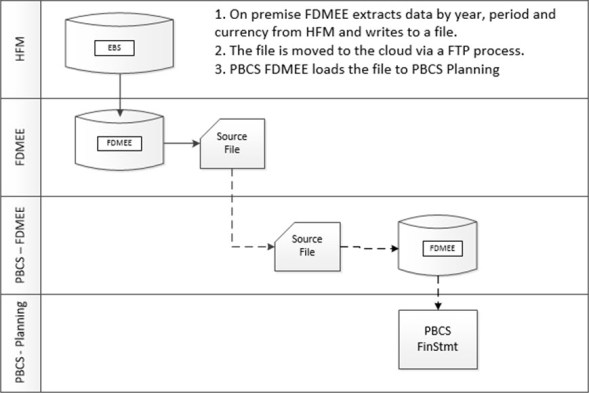
1st I started with the batch script to call EPMAutomate and load the file to PBCS Data Management (FDMEE on the cloud). Then parameterized what I could pass from another batch script.
This script is named HFM_to_PBCS_Local_Detail.bat

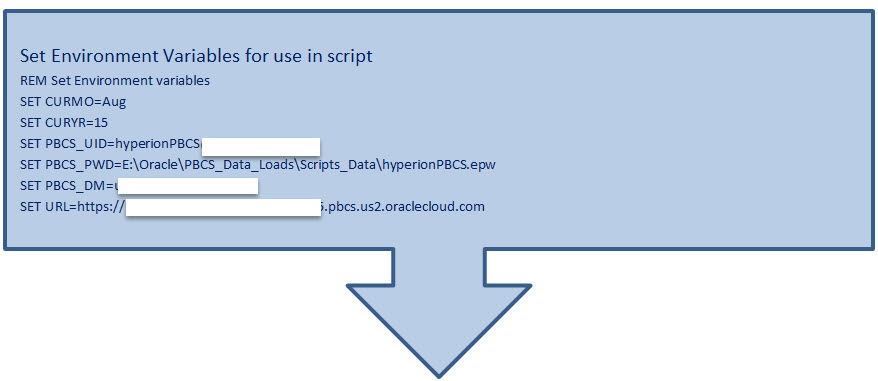
REM ***** Set Environment Variables
call E:\Oracle\PBCS_Data_Loads\Scripts_Data\env.bat

SET Month=%1
SET Year=%2
SET File=%3

copy E:\Oracle\FDMEE\outbox\%File% E:\Oracle\PBCS_Data_Loads\Scripts_Data\HFMtoPBCS\Load_Files\HFM_to_PBCS_Local_FY%Year%_%Month%.dat

SET Period=%1
SET FY=FY%2

CD /D %~dp0
C:

REM run business rule to clear data, variables passed for runtime prompts
REM Variable hardcoded for currency (Local_$ for local load, Reporting_$ for USD load)
Call epmautomate runbusinessrule Int_Clear_Act_data_befload_from_HFM Period=%Period% Year=%FY% GCurrency=”Local_$”
REM FDMEE PROCESS:
CALL EPMAUTOMATE UPLOADFILE
E:\Oracle\PBCS_Data_Loads\Scripts_Data\HFMtoPBCS Load_Files\HFM_to_PBCS_Local_FY%2_%1.dat inbox
ECHO File loaded to FDMEE Inbox
Call EPMAUTOMATE RUNDATARULE BB_HFM_to_PBCS_Actual %1-%2 %1-%2 REPLACE STORE_DATA HFM_to_PBCS_Local_FY%2_%1.dat
ECHO Data Load Rule Executed
REM run business rule to aggregate data, variables passed for runtime prompts
REM Variable hardcoded for currency (Local_$ for local load, Reporting_$ for USD load)
Call epmautomate runbusinessrule Int_Agg_data_aftload_from_HFM Year=%FY% GCurrency=”Local_$”
REM IF %ERRORLEVEL% NEQ 0 goto :ERROR
OK, so now I have a batch script to load the data to PBCS and run the required Business Rules. However there are variables that need to be passed into this script, where do they come from?
2nd I created a script to call HFM_to_PBCS_Local_Detail.bat and pass variables. The intention behind this was to create a simple script that could be recreated every time the parameters/variables changed. The parameters change each time the Data Load Rule is executed in FDMEE. I knew I could use an AftLoad script in FDMEE and leverage Jython(Python) to recreate an this batch script with new parameters. Also I could use the Jython to execute the newly created batch script.
HFM_to_PBCS_Local_Execution.bat – This script will call HFM_to_PBCS_Local_Detail.bat and pass variables.
Batch Script contents:
E:\Oracle\PBCS_Data_Loads\Scripts_Data\HFMtoPBCS\Batch_Files\Detailed_Scripts\HFM_to_PBCS_Local_Detail.bat>E:\Oracle\PBCS_Data_Loads\Script_Datas\HFMtoPBCS\Output\HFM_to_PBCS_Local_Detail.txt Dec 14 Act_to_File_453.dat
Script Breakdown:
String 1: E:\Oracle\PBCS_Data_Loads\Scripts_Data\HFMtoPBCS\Batch_Files\Detailed_Scripts\HFM_to_PBCS_Local_Detail.bat
-This value never changes. The value is hardcoded in the AftLoad script. It calls the detailed batch script that moves the file from on premise to PBCS and processes it.
String 2:
>E:\Oracle\PBCS_Data_Loads\Scripts_Data\HFMtoPBCS\Output\HFM_to_PBCS_Local_Detail.txt
-This value never changes. The value is hardcoded in the AftLoad script. The “>” command redirects the output from the command line session to the stated path\file “E:\Oracle\PBCS_Data_Loads\Scripts_Data\HFMtoPBCS\Output\HFM_to_PBCS_Local_Detail.txt”.
String 3:
Dec
– The period value is a variable. It changes every time the Jython AftLoad script creates the batch script and uses the “MONTH = (POV[:3])” command.
String 4:
14
– The year value is a variable. It changes every time the Jython AftLoad script creates the batch script and uses the “YEAR =(POV[-2:])” command.
String 5:
Act_to_File_453.dat
– The dat file name is a variable. It changes every time the Jython AftLoad script creates the batch script and uses the the following commands.
LOC = str(fdmContext[“LOCNAME”])
LID = str(fdmContext[“LOADID”])
TARGET + “_” + LID + “.dat”
3rd Add the coding to the AftLoad script define the creation of the HFM_to_PBCS_Local_Execution.bat described above.
I skipped the basic FDMEE configuration of the Source Systems, Target Applications and Import Formats.
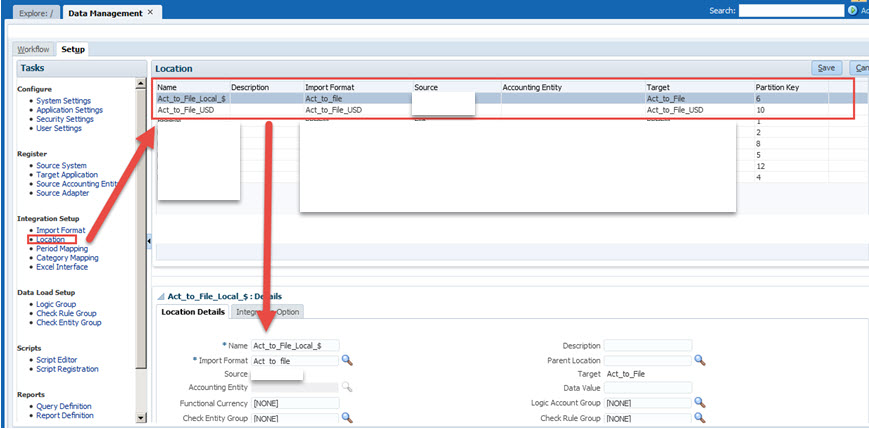
Location:
The Location links the Source System, Target Application and Import Format together.
Act_to_File_Local_$ – File for local currency

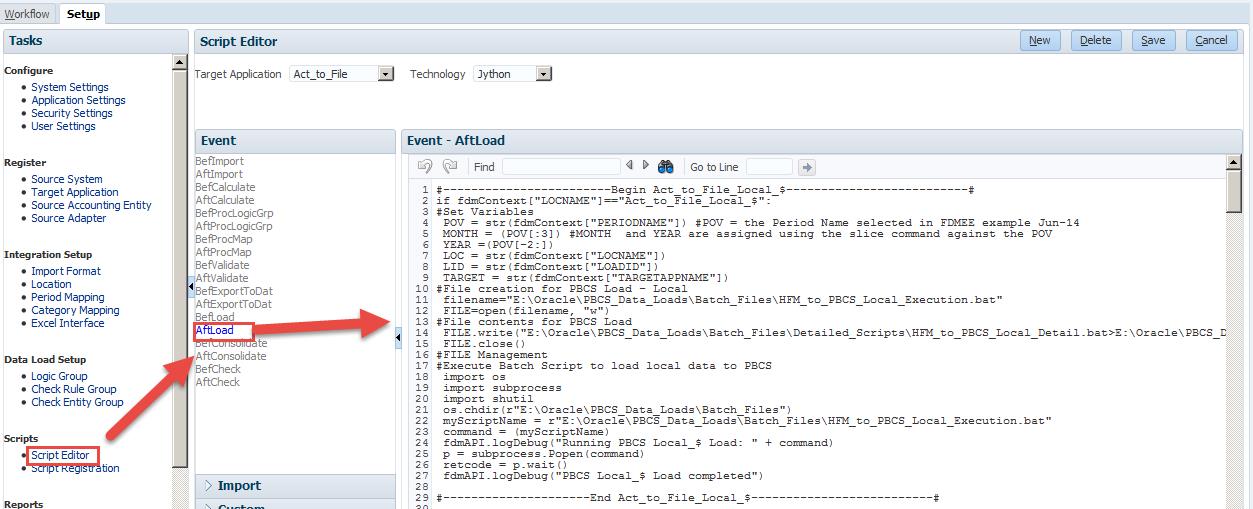
Script Editor:
An AftLoad script is used to generate a batch file and executed it. The batch file contains unique parameters that are generated when the Data Load Rule is executed.

AftLoad Jython Script:
#————————Begin Act_to_File_Local_$————————–#

if fdmContext[“LOCNAME”]==”Act_to_File_Local_$”:

#Set Variables
POV = str(fdmContext[“PERIODNAME”]) #POV = the Period Name selected in FDMEE example Jun-14
MONTH = (POV[:3]) #MONTH and YEAR are assigned using the slice command against the POV
YEAR =(POV[-2:])
LOC = str(fdmContext[“LOCNAME”])
LID = str(fdmContext[“LOADID”])
TARGET = str(fdmContext[“TARGETAPPNAME”])

#File creation for PBCS Load – Local filename=”E:\Oracle\PBCS_Data_Loads\Scripts_Data\HFMtoPBCS\Batch_Files\HFM_to_PBCS_Local_Execution.bat”
FILE=open(filename, “w”)
#File contents for PBCS Load
FILE.write(“E:\Oracle\PBCS_Data_Loads\Scripts_Data\HFMtoPBCS\Batch_Files\Detailed_Scripts\HFM_to_PBCS_Local_Detail.bat>E:\Oracle\PBCS_Data_Loads\Scripts_Data\HFMtoPBCS\Output\HFM_to_PBCS_Local_Detail.txt”+” “+ MONTH +” “+ YEAR + ” ” + TARGET + “_” + LID + “.dat”)
FILE.close()

#Execute Batch Script to load local data to PBCS
import os
import subprocess
import shutil
os.chdir(r”E:\Oracle\PBCS_Data_Loads\Scripts_Data\HFMtoPBCS\Batch_Files”)
myScriptName = r”E:\Oracle\PBCS_Data_Loads\Scripts_Data\HFMtoPBCS\Batch_Files\HFM_to_PBCS_Local_Execution.bat”
command = (myScriptName)
fdmAPI.logDebug(“Running PBCS Local_$ Load: ” + command)
p = subprocess.Popen(command)
retcode = p.wait()
fdmAPI.logDebug(“PBCS Local_$ Load completed”)
#———————End Act_to_File_Local_$————————–#
#———————-Begin Act_to_File_USD————————–#
elif fdmContext[“LOCNAME”]==”Act_to_File_USD”:
#Set Variables
POV = str(fdmContext[“PERIODNAME”]) #POV = the Period Name selected in FDMEE example Jun-14
MONTH = (POV[:3]) #MONTH and YEAR are assigned using the slice command against the POV
YEAR =(POV[-2:])
LOC = str(fdmContext[“LOCNAME”])
LID = str(fdmContext[“LOADID”])
TARGET = str(fdmContext[“TARGETAPPNAME”])
#File creation for PBCS Load – Local
filename=”E:\Oracle\PBCS_Data_Loads\Scripts_Data\HFMtoPBCS\Batch_Files\HFM_to_PBCS_USD_Execution.bat”
FILE=open(filename, “w”)
#File contents for PBCS Load
FILE.write(“E:\Oracle\PBCS_Data_Loads\Scripts_Data\HFMtoPBCS\Batch_Files\Detailed_Scripts\HFM_to_PBCS_USD_Detail.bat>E:\Oracle\PBCS_Data_Loads\Scripts_Data\HFMtoPBCS\Output\HFM_to_PBCS_USD_Detail.txt”+” “+ MONTH +” “+ YEAR + ” ” + TARGET + “_” + LID + “.dat”)
FILE.close()
#FILE Management
#Execute Batch Script to load local data to PBCS
import os
import subprocess
import shutil
os.chdir(r”E:\Oracle\PBCS_Data_Loads\Scripts_Data\HFMtoPBCS\Batch_Files”)
myScriptName = r”E:\Oracle\PBCS_Data_Loads\Scripts_Data\HFMtoPBCS\Batch_Files\HFM_to_PBCS_USD_Execution.bat”
command = (myScriptName)
fdmAPI.logDebug(“Running PBCS USD Load: ” + command)
p = subprocess.Popen(command)
retcode = p.wait()
fdmAPI.logDebug(“PBCS USD Load completed”)
#———————–End Act_to_File_USD————————–#
To summarize, the script is executed when we run a Data Load Rule for certain Locations.
The AftLoad script runs after FDMEE has pulled data from HFM, mapped it and written (loaded) it to a file.
The Jython script creates a batch script with parameters that call another batch script and passes the parameters as the variables.
In the end there is not that much too it. Some setup time and testing but the overall process runs pretty quick and the client is happy with the outcome.
I hope you found this post helpful.
Regards,
Scott Williams































 EPM4ALL